CHROME PRIVATE BETA

The verified Chrome Web Store listing is pending.

View install status
MULTI-SCREEN CAPTURE FOR AI BETA

Collect the visuals. Build the context.

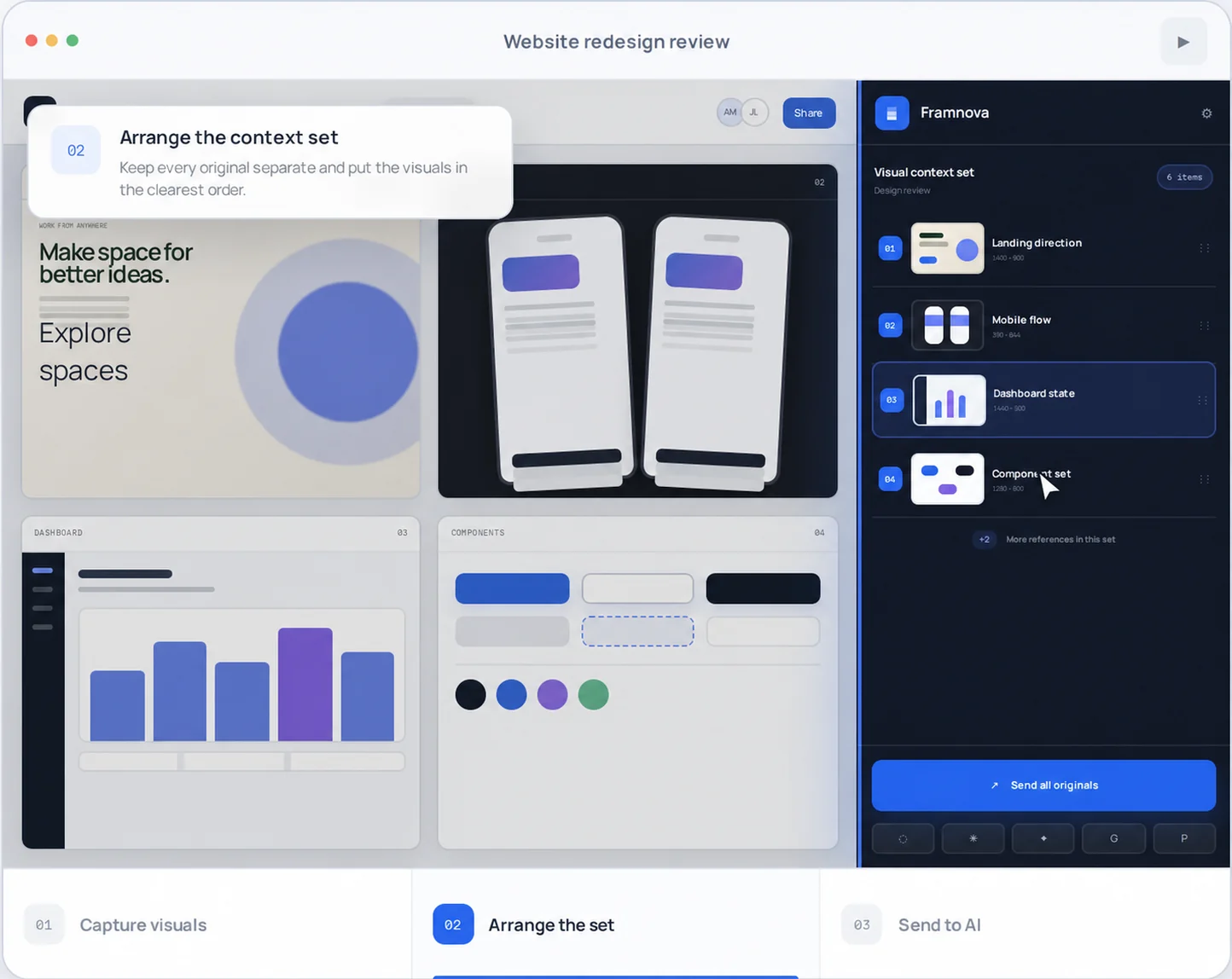
Capture related designs, UI states, web references, or evidence. Keep every original separate, arrange the set as a visual brief, and deliver it to your AI chat.
Chrome Web Store · listing pendingNo verified public install link exists yet.
PRODUCT WORKFLOW Example visual set · separate originals · one send PRODUCT PREVIEW
ScreenCrate collecting landing, mobile, dashboard, and component visuals into one ordered design review set
01Capture regionsChoose only what matters. 02Keep the orderEvery capture stays separate. 03Send onceDeliver all originals together.

Designed for the AI tools you already use

  • ChatGPT
  • Claude
  • Gemini
  • Grok
  • Perplexity
01 / ONE CONTINUOUS FLOW

Multiple visuals.
One clear brief.

ScreenCrate turns scattered designs, references, and states into one set AI can understand as a single task. You choose each region and the order that explains the context best.

01
ACTIVATE

Select any region.

Use a configurable shortcut and confirm only the relevant area of the current tab.

AltS
02
ORGANIZE

Build the sequence.

Rename, reorder, or remove captures. Each stays as an independent original file.

010203N
03
DELIVER

Prepare every original.

Choose a supported destination and verify the attachments before you send. Nothing moves until you decide.

All originals
02 / BEYOND PIXELS CODE CONTEXT · REPOSITORY BETA

A screenshot that
knows its structure.

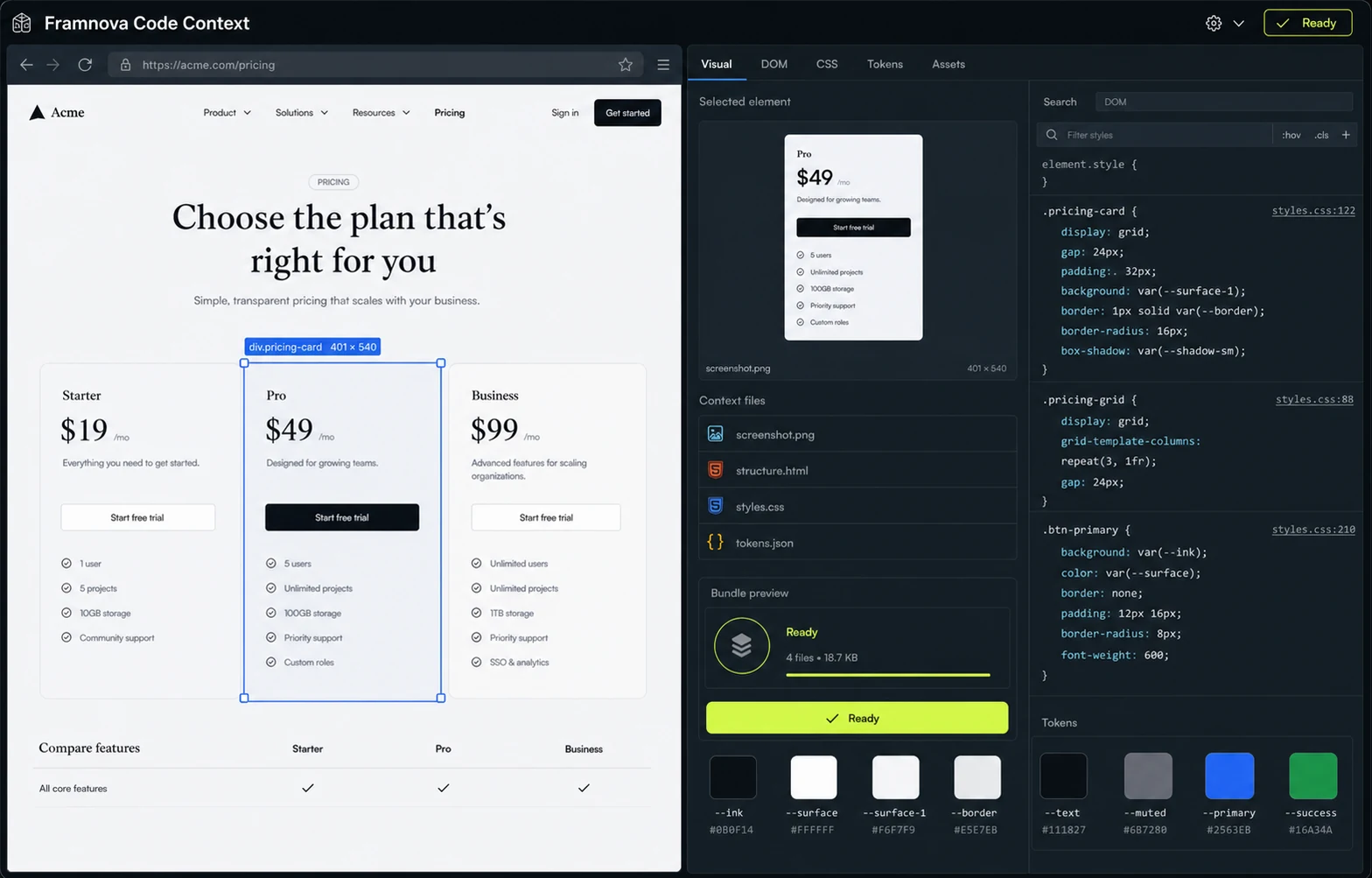
For design and frontend work, an image explains how it looks. Code Context also prepares the rendered DOM, computed styles, visual tokens, and asset references for the selected element.

Element selection, styles, site overview, and context copy are available in the repository beta. Live editing and full Tailwind, React, and Vue export UIs remain planned.
ScreenCrate Code Context REPOSITORY BETA · UI EVOLVING
ScreenCrate Code Context showing a selected pricing card with its screenshot, HTML, CSS, tokens, and asset bundle
AI RECEIVES

Separate original images in the exact capture order.

  • PNGscreenshot.pngOriginal capture
  • HTMLstructure.htmlClean rendered DOM
  • CSSstyles.cssRelevant computed styles
  • { }tokens.jsonColor, type & spacing
See how MCP delivers the bundle to compatible clients
03 / PERMISSIONS & BOUNDARIES

Powerful when you activate it.
Quiet when you do not.

The store build is being designed around explicit actions. Exact permission wording may change during Chrome Web Store review.

01WHEN CAPTURING

Active tab, explicit action.

The region selector runs on the page you activate. There is no continuous background capture.

02WHEN SENDING

Only the chosen destination.

An AI adapter is used only after you choose that destination and press Send.

03BEFORE ATTACHING

Local queue by default.

The sequence stays in the browser until you choose a destination and confirm the attach action.

SURFACESTATUSBOUNDARY
Regular webpagesSupported

Content rendered by Chrome in the active tab.

ChatGPT, Claude, Gemini, Grok & PerplexityβBeta adapters

Each destination is tested and versioned separately as its interface changes.

Browser UI & protected pagesUnavailable

Chrome blocks its own UI, the Web Store, and some protected surfaces.

Desktop applicationsNeeds Companion

Capture outside the browser requires the future desktop companion.

04 / INSTALL STATUS

Be first in line
when the store opens.

ScreenCrate does not yet have a public, verified Chrome Web Store listing. Leave your email to receive the official link—never a file from an unknown source.

Preview: email collection will be connected before public launch.
  1. 01
    NOW

    Beta access list

    Register your interest and receive private-testing updates.

  2. 02
    NEXT

    Chrome Web Store review

    Permissions, privacy disclosures, and adapter tests are finalized.

  3. 03
    AT RELEASE

    Verified one-click install

    This page will link directly to the official listing as soon as it is published.

EVERY SCREEN IN CONTEXT

Stop explaining what
AI should be able to see.

Join the Chrome betaView pricing